
Welcome to Cardt

Learn about setting up your Cardt Smart Business Card

Do you own a Cardt card?
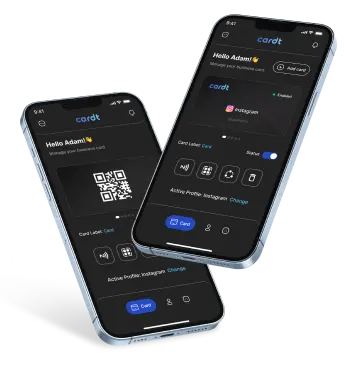
Download and Install the Cardt App to follow the process


  Play Store
  App Store

What is your device OS type?

Log in with Apple ID or
gmail account

Verify your email with
OTP

Click on profile icon to
create your profile

Click on Create profile to
add your profile

Choose the type of Cardt Card you want to create and link with your account.

Provide additional information for your profile and then click the Save button to update your profile.

Congratulations! Your profile has been successfully created. The next step is to activate it on your card.

Navigate to the 'Cards' tab and select the 'Select Profile' option.

Select the profile you want to activate and link with your Cardt card.

Click Activate Profile on pop-up.

Your profile is now linked to your card successfully !

Log in with gmail account

Verify your email with OTP

Click on profile icon to create your profile

Click on Create profile to add your profile

Choose the type of Cardt Card you want to create and link with your account.

Provide additional information for your profile and then click the Save button to update your profile.

Congratulations! Your profile has been successfully created. The next step is to activate it on your card.

Navigate to the 'Cards' tab and select the 'Select Profile' option.

Select the profile you want to activate and link with your Cardt card.

Click Activate Profile on pop-up.

Your profile is now linked to your card successfully !

"Revolutionize your networking experience with Cardt - the cutting-edge networking tool. Get your Cardt Card today and start connecting like never before!"


  Get Cardt
What is your device OS type?

Log in with Apple ID or gmail account

Verify your email with OTP

Click on profile icon to create your profile

Click on Create profile to add your profile

Choose the type of Cardt Card you want to create and link with your account.

Provide additional information for your profile and then click the Save button to update your profile.

Congratulations! Your profile has been successfully created. The next step is to activate it on your card.

Navigate to the 'Cards' tab and select the 'Select Profile' option.

Select the profile you want to activate and link with your Cardt card.

Click Activate Profile on pop-up.

Your profile is now linked to your card successfully !

Log in with gmail account

Verify your email with OTP

Click on profile icon to create your profile

Click on Create profile to add your profile

Choose the type of Cardt Card you want to create and link with your account.

Provide additional information for your profile and then click the Save button to update your profile.

Congratulations! Your profile has been successfully created. The next step is to activate it on your card.

Navigate to the 'Cards' tab and select the 'Select Profile' option.

Select the profile you want to activate and link with your Cardt card.

Click Activate Profile on pop-up.

Your profile is now linked to your card successfully !

Which method would you prefer to use to link your profile?

Click on NFC icon from card tab

Tap your card on phone after you see ‘Ready to scan’ popup and link your card will be linked via NFC.

Note: To link your device, tap the upper back side of your iOS phone, or turn on NFC in the settings of your Android phone and tap the upper back side of your phone. Some Samsung devices have NFC located at the back, bottom section of their phones.

Congratulations! You have successfully linked your Cardt Card using NFC.

Click on QR icon from card tab

Click on QR icon from card tab

Congratulations! You have successfully linked your Cardt Card using QR Code.

Which method would you prefer to use to share your profile?

Tap your Cardt Card on phone, click on the NFC tag notification.

NOTE: To link your device, tap the upper back side of your iOS phone or turn on NFC in the settings of your Android phone and tap the upper back side of your phone, some Samsung devices have NFC located at the back bottom section of their phones.

When you tap the NFC tag, a notification will appear on your phone. Tap on the notification to open your default browser. From there, you can choose to either download the contact information to save it directly onto your phone, or share your own contact details with the owner of the NFC tag.

NOTE: Android users would have to select their Google account in which they want to save their contact once the contact is downloaded.

To receive the contact details of the recipient, tap on "Share Contact" and they will be able to send you their details.

Congratulations! Your details have been successfully shared.

Scan the QR on the Cardt card.

To save the contact on your phone, tap on "Download Contact". If you want to send your own contact details to the card holder, tap on "Share Contact".

NOTE: For Android users, we recommend using Google Lens for the best experience when scanning the QR code. After the contact information is downloaded, select the Google account where you would like to save the details.

To receive the contact details of the recipient, tap on "Share Contact" and they will be able to send you their details.

Congratulations! Your details have been successfully shared.

Im Bereich der digitalen Casinos zählt https://goldenpanda1.de zu den Plattformen, die sich nicht hinter etablierten Größen verstecken müssen. Die Server befinden sich in zertifizierten Rechenzentren mit hoher Sicherheitsstufe. Statusmeldungen über technische Wartungsarbeiten werden frühzeitig kommuniziert. Match-Boni mit bis zu 200 Prozent auf die Einzahlung sind in Sonderaktionen verfügbar. Push-Benachrichtigungen informieren über neue Aktionen und persönliche Bonusangebote. VIP-Live-Tische bieten höhere Einsatzlimits und exklusive Bedingungen. Strategie-Guides für Tischspiele richten sich an Einsteiger und Fortgeschrittene gleichermaßen. Mehrere Zahlungspartner sorgen für eine hohe Verfügbarkeit der Kassendienste rund um die Uhr. Klassische Tischspiele wie Blackjack, Roulette und Baccarat sind in zahlreichen Varianten verfügbar. Übergänge zwischen den Sektionen erfolgen flüssig und unterbrechen den Spielfluss nicht. Das Casino überzeugt mit einer Kombination aus Substanz, Stil und solider technischer Umsetzung.

Close My Cart
Close Wishlist
Recently Viewed Close
Close

Close
Categories